For Claude desktop on Windows

All your Claude accounts. One Claude desktop.

SaneCode lets you run multiple Claude desktops on Windows. Switch without signing out, or put them side by side in Split, Grid or Canvas. When one account hits its limit, continue the same session in another.

Free for 2 accounts. Uses your existing Claude desktop. Updated November 16, 2026. What SaneCode is, in full
Live demoClick a step
SSaneCodeFREE
Wwork@acme.comDocked here
— ▢ ✕
AccountsSessions
Accounts
Wworkmain app · docked here
Ppersonalopen in its own window
Settings
+New session
◌Chats
▭Projects
shop
Fix checkout race
Fix flaky payment test
docs
Release notes 2.4
Fix checkout raceD:\shop
The checkout total sometimes double-counts the discount. Find the race and fix it.
Read src/checkout/total.ts
Found it: applyDiscount runs twice when the cart updates during a coupon request. I'll apply the coupon once per cart version.
Ran npm test · 42 passed
Reply…Opus 5.5
0sign-outs to switch accounts
1 clickto continue a session elsewhere
100%the official Claude desktop
0%CPU while you're not using it
Why it exists

The Claude desktop app is too good to give up. Using it with more than one account isn’t.

01

Switching accounts is a sign-out dance

Claude desktop holds one account. Switching means signing out, signing in again, and your browser’s claude.ai session flips along with it, breaking your next web chat.

SANECODEEvery account stays signed in, each in its own Claude desktop. Switch with a click or Ctrl+1…9. Nothing signs out, not even your browser.
Sidebar · Accounts
02

You hit the limit mid-task

One account runs out halfway through a refactor. Moving on means a new chat in another account and explaining everything again.

SANECODEPick the session, choose another account, keep going. Same conversation, same project folder, full context.
Sessions tab
03

One Claude at a time

Work and personal, a client org and your own plan: the desktop app only runs one of them, so the others sit idle.

SANECODERun them all at once and see them side by side: Split and Grid are free, Canvas (Pro) arranges any number. One keeps generating while you work in another.
Title bar · status dot
04

Orchestrators drop the app you like

Multi-account tools are orchestrators built on the Claude Code CLI or Anthropic’s Agent SDK. You lose the desktop app and its native behavior. And SDK traffic is metered its own way: Anthropic’s 5-hour meter charged Agent SDK use about 1.7× more than Claude Code, until T3 Code worked around it in v0.1.7.

SANECODESaneCode isn’t an orchestrator: it runs the official Claude desktop, unmodified, and you talk to Claude directly. Every feature is there.
The official Claude desktop
05

The browser extension wants the same account

Claude in Chrome has to be signed into the same account as the desktop app. Switch accounts and you sign the extension out and in again too, or keep a separate Chrome profile per account.

SANECODEEvery account gets its own Claude in Chrome connection inside one Chrome profile, the one with your usual sign-ins and tabs. Nothing to re-sign when you switch.
Settings · Shared browser
06

Updates and resets scramble things

A reinstall or reset and suddenly the wrong account opens, or none at all.

SANECODESaneCode brings in the Claude you already have, notices updates and resets, and repairs its links in one click without deleting anything.
Settings · Claude desktop
Heard on X

What do people with several Claude accounts say?

The same complaints, again and again: signing out to switch, a second Claude that half works, Claude in Chrome on the wrong account, a usage limit that ends the conversation. Real posts, linked.

i want to use the claude desktop app but how do you guys manage multiple accounts? it's such a pain to log out and lose your sidebar etc am i missing something?


@argofowlOct 18, 2026 · 298 likes

@amorriscode Thanks! Meanwhile, since it's Electron, I just asked Claude to set it up: a second instance with its own --user-data-dir, both accounts running side by side. Works, but native multi-account would be way better — some features (e.g. Chrome pairing) are off in the 2nd profile.


@matautuOct 17, 2026 · 11 likes

spent a minute looking for the account switcher in claude settings. found it. it's the log out button at the bottom. log out, retype password, wait for 2fa, log back in. twice a day, every day. @ClaudeDevs one toggle for work and personal PLEASE. Both have separate memory, separate connectors, separate projects and separate chat history.


@rehmanrinddAug 27, 2026 · 1 like

@trq212 By far the worst thing right now in computer use is "account mismatch" when you use multiple accounts on Claude Code. When you switch accounts on Claude Code but not on the browser claude-in-chrome fails until you login with the same account on browser too.


@evrimagaciSep 26, 2026 · 1 like

@trq212 One thing is chats not persistent on ur pc, with codex when my usage runs out I just switch logins and continue the chat whereas with Claude I've got to make a handoff and it's just a longer process than how codex manages it. Also, if you allowed multiple accounts at once so when usage runs out on one you can just continue the chat without even having to log out and login to another account - that would seriously make the workflow smoother.


@socloappSep 26, 2026 · 1 like

Feature request for @claude: account switching across different emails. Enterprise on my work address, Pro on my personal one. Today that's a full sign-out/sign-in every time — the native switcher only works if both accounts sit on the same email. Chrome profiles, but for Claude.


@johnerikAug 16, 2026 · 1 like

If my usage limit in Claude Code runs out, can I just swap to a second account in Claude Desktop App and pick up exactly where I left off in the same local project? #ClaudeCode #claude


@CebullaRickNov 8, 2026

@claudeai Codex/ChatGPT desktop app can have multiple instances of the app. Claude desktop has something like this planned? Or can it already do this and I'm missing something? Multiple panes in Code is not the same. Esp on multi monitor setups, being able to have full views of multiple instances at once is really really nice.


@DarrenTjanAug 26, 2026

Anthropic: Claude can autonomously use your computer, code, market, design, run your life, job and business Me: Amazing, can I log into both my work and personal email accounts on the desktop app? Anthropic: Let's not get ahead of ourselves. Log out first.


@AnanyaGrover1Sep 2, 2026
Not an orchestrator

You talk to Claude. Not to us.

SaneCode doesn’t wrap Claude in its own chat or drive it through the CLI or SDK. Each account is the official Claude desktop app, with the instructions, tools and features Anthropic tuned it with. We keep those apps in one place and handle the sign-ins and switching around them.

Why native beats orchestrators   SaneCode vs T3 Code

How it works

Each account is its own real Claude.

  1. Open SaneCode. It finds the Claude you already use and brings it in as your first account, still signed in.
  2. Add accounts. Name one, a fresh Claude opens inside SaneCode, you sign in once. It stays signed in.
  3. Switch instantly. Click an account or press Ctrl+1…9. The others keep running.
  4. Keep going anywhere. Hit a limit? Continue the session in another account.
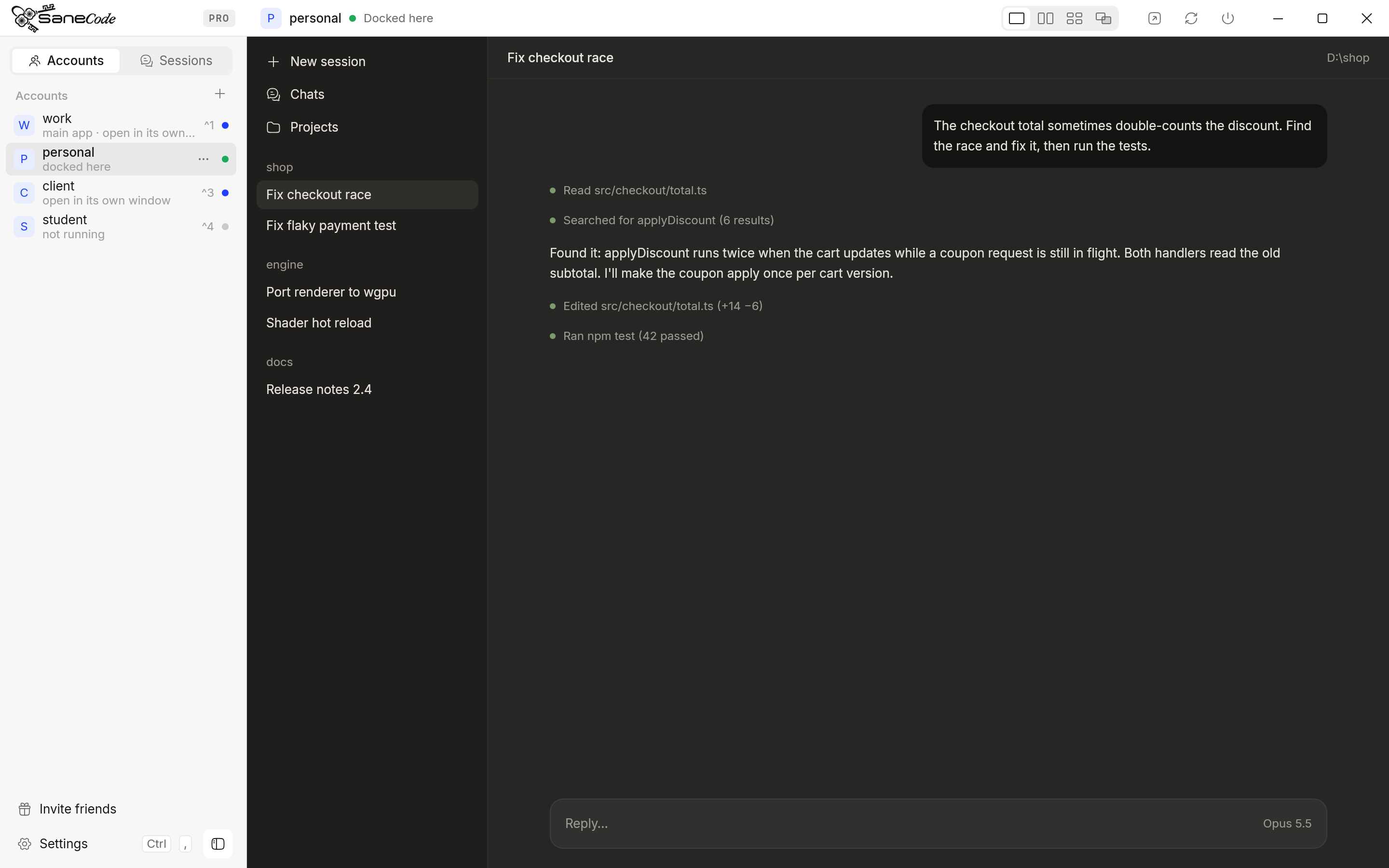
SaneCode with a Claude desktop docked on the right and four accounts in the sidebar
Switch without signing out

Change Claude accounts in one click.

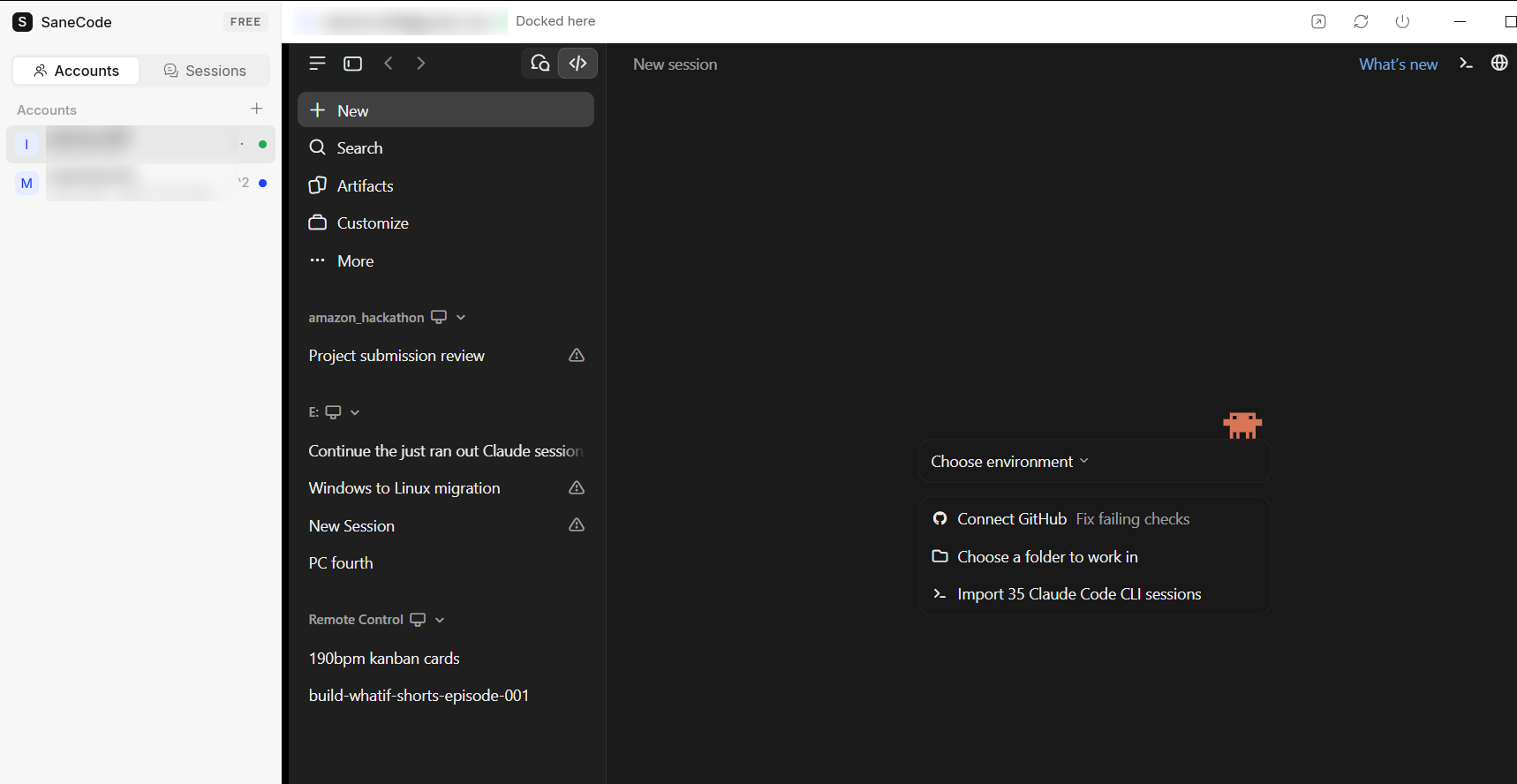
Switching accounts in Claude desktop normally means signing out, signing in again, and having your browser’s claude.ai session flip along with it. In SaneCode every account stays signed in, each in its own Claude desktop. Click one in the sidebar or press Ctrl+1…9; the others keep running in the background. Add one with +.

  • Run several Claude accounts at the same time: one can keep working while you use another
  • Each account keeps its own sign-in, chats, projects and connectors
  • Put two side by side with Split, or four in a 2×2 with Grid
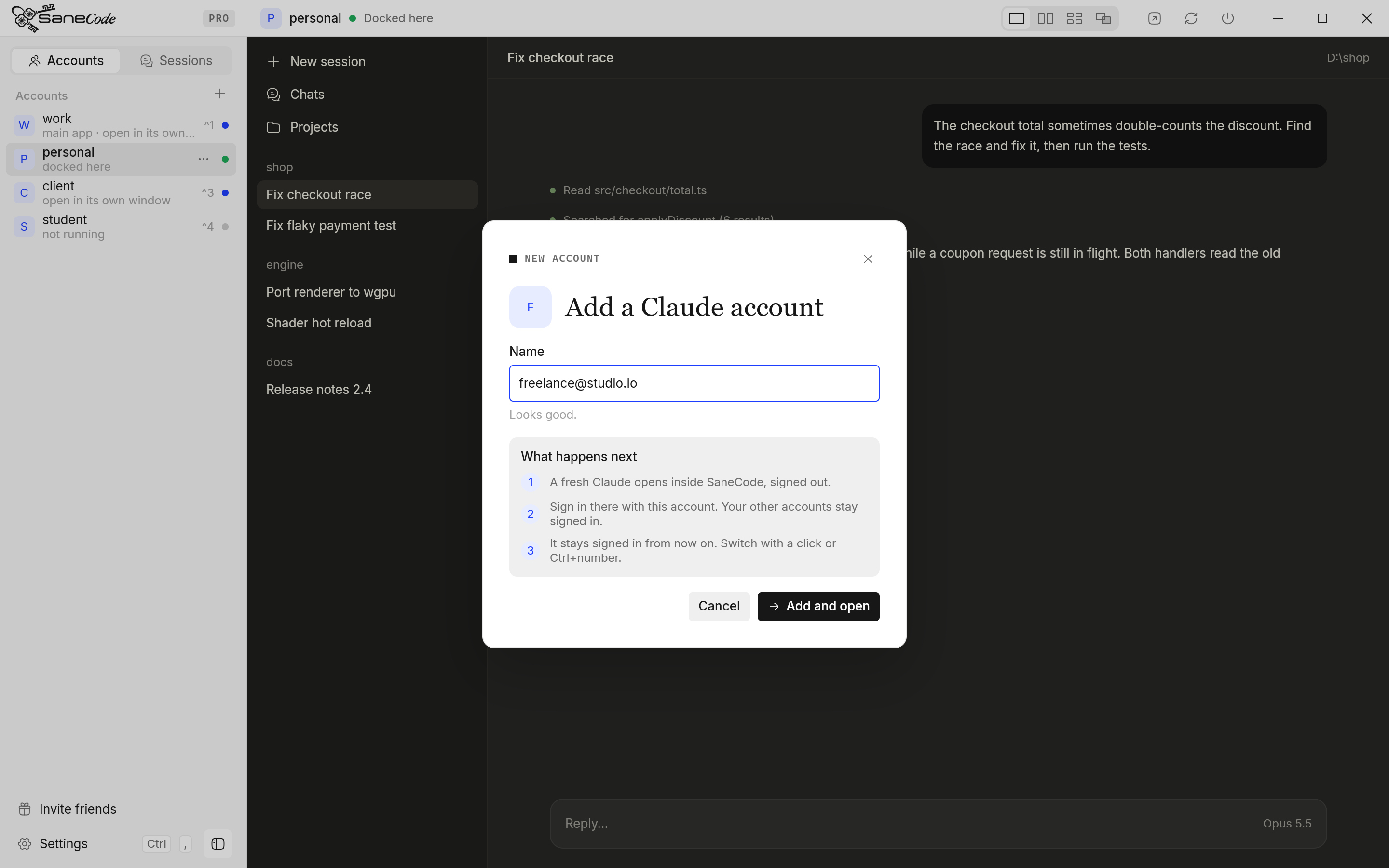
The Add a Claude account dialog
Session Relay · continue after a usage limit

Claude says “usage limit reached”? Keep going in another account.

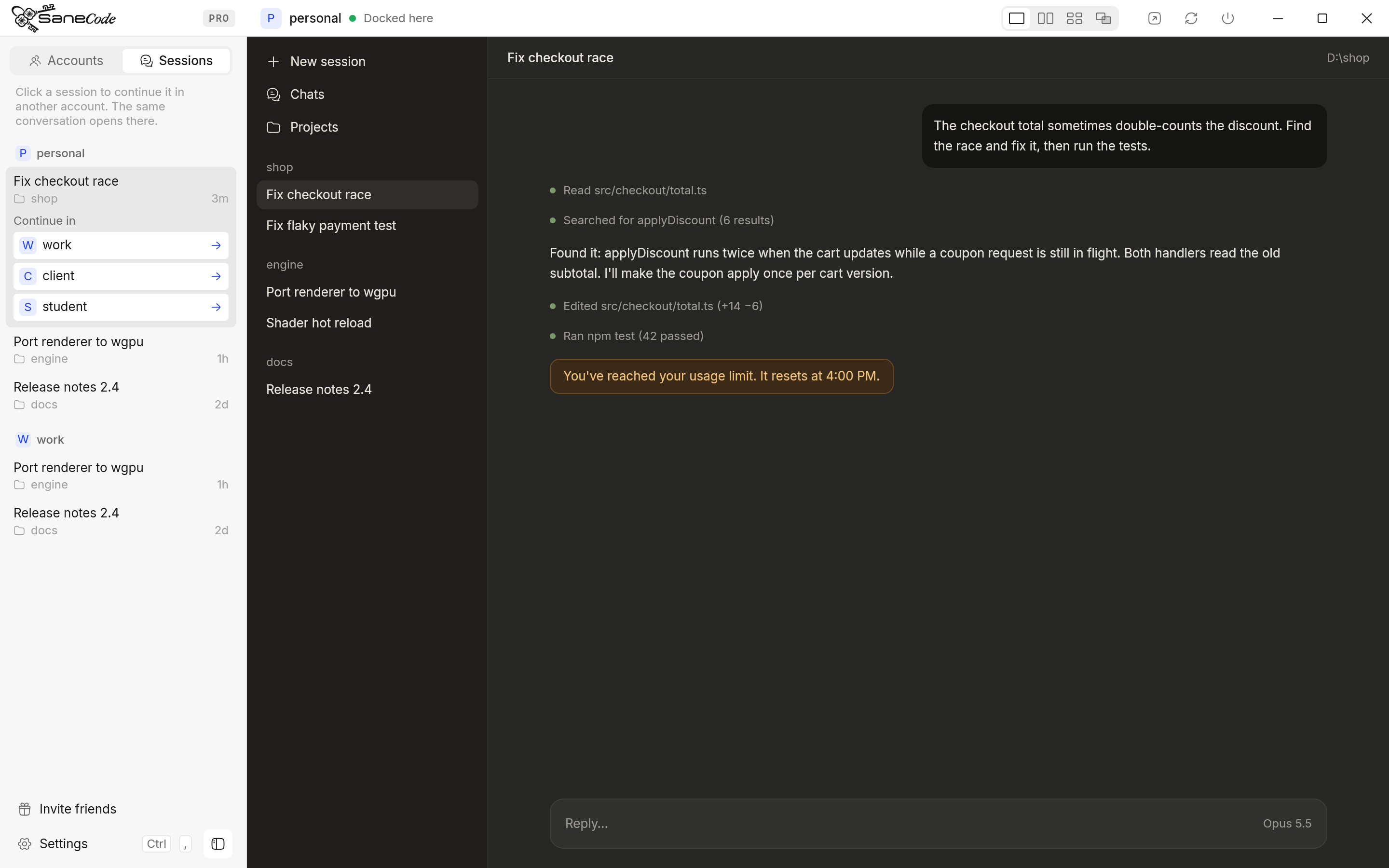
When one Claude account runs out of messages in the middle of a task, you don’t have to wait for the reset or start a new chat and explain everything again. In SaneCode, open Sessions, choose the Claude Code conversation you were in, and pick another of your accounts that still has room. The same conversation opens there, in the same project folder, with everything Claude already knew, and you carry on from the last message.

  • You continue the same session: earlier messages, decisions and the files it was working on are all there
  • Nothing is uploaded or copied to a server: Claude keeps Code conversations on your PC, SaneCode just lists this one in the other account
  • If that account was already open, one click on Restart makes the conversation appear

Step by step: continue a Claude conversation in another account

SaneCode Sessions tab: continuing a Claude Code conversation in another account after a usage limit
Sign in once, with help

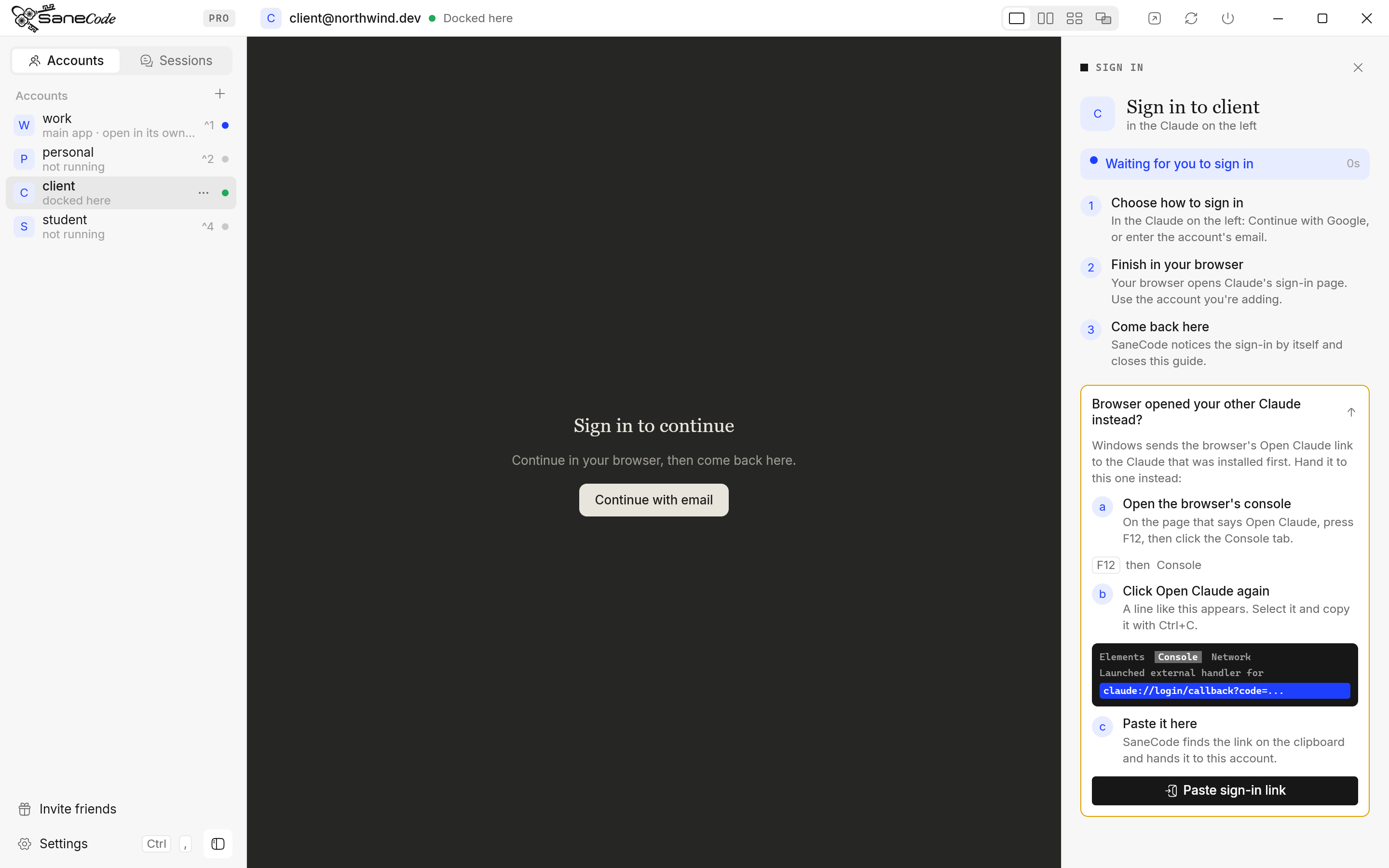
Adding an account walks you through the sign-in.

Name the account and a fresh Claude opens inside SaneCode. A guide sits beside it, waits while you sign in through your browser, and notices the moment you’re done. If the browser sends the sign-in to your other Claude (Windows routes it to the first one installed), the guide shows exactly how to hand it over, with a picture of what to copy.

  • Your current Claude is brought in on first run, still signed in
  • Each account signs in once and stays signed in
  • SaneCode never sees passwords or tokens

How adding and signing in works

SaneCode sign-in guide waiting beside a Claude desktop window
Several Claudes at once

Can you run two Claude desktop apps at the same time?

Yes. Claude desktop runs one account per app, so SaneCode runs one official Claude desktop per account and docks the one you pick beside its sidebar. The others keep running: one can finish a long Code task while you chat in another. People already do this by hand with a second --user-data-dir copy; SaneCode sets it up, keeps every copy signed in and puts them in one window.

  • Work, personal and a client’s Team seat, all signed in at once
  • Every copy is the official app, so each Claude update just works
  • One setting gives Claude Code in every account a theme, in light or dark (Claude themes)
  • Claude Code plugins, skills and mods you install once work in every account (how)

Switching between accounts

A real Claude desktop docked inside SaneCode on Windows, with the account sidebar on the left (emails blurred)
Split · Grid · Canvas

Can you see two Claude accounts side by side?

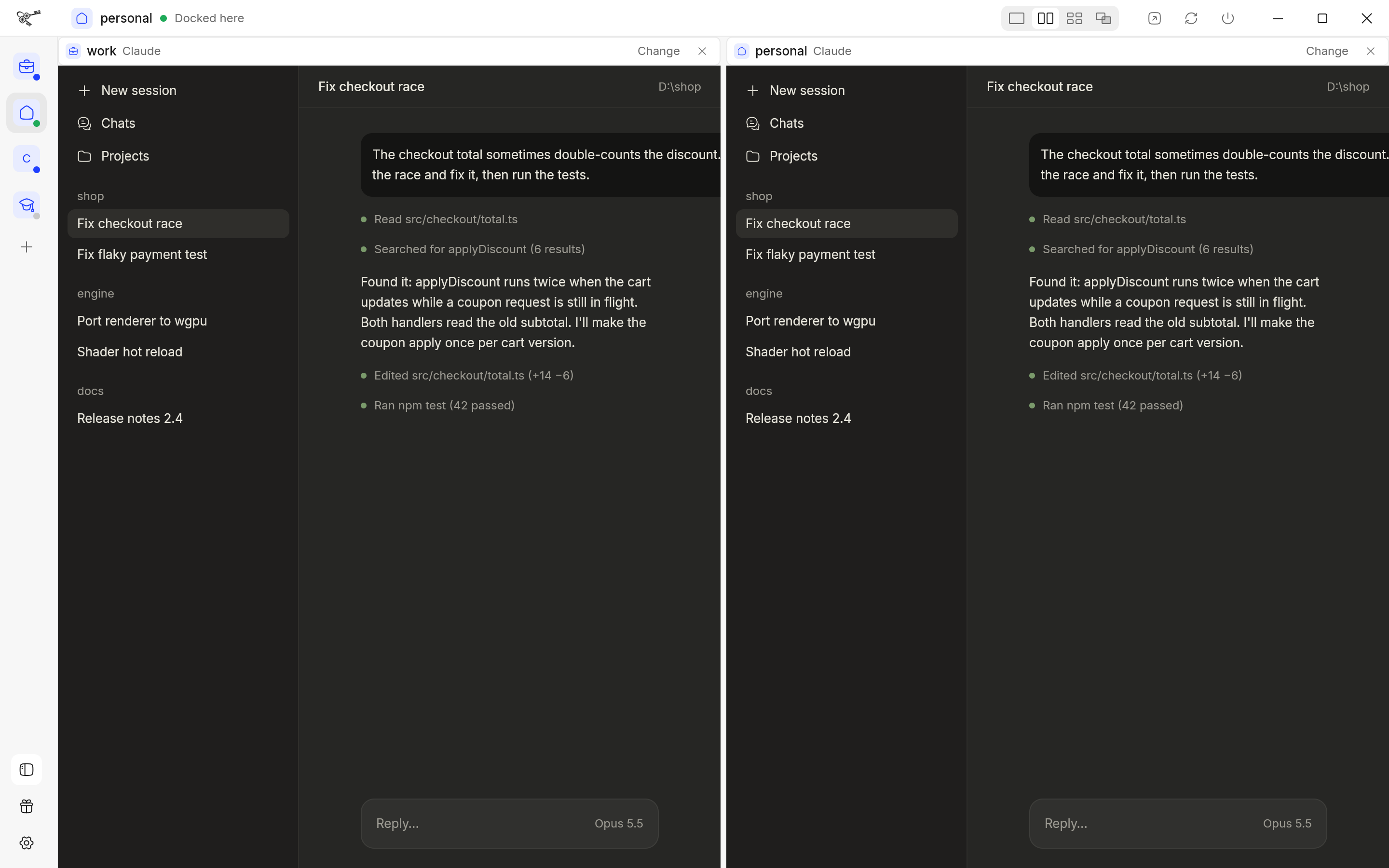
Yes. Pick a layout in the title bar. Split puts two Claudes next to each other with a line you drag to resize; Grid shows four in a 2×2; Canvas is a board where you move, resize and pan as many Claude windows as you like. Each pane shows any account or any chat, with a header to change what’s in it. Split and Grid are free; Canvas is Pro.

  • Click a pane to type in it: your keys go where you clicked
  • Chats you pop out of Claude show as “+1 window”: bring them in as tabs or into a pane
  • Layouts are remembered when you open SaneCode again

Claude side by side on Windows   Layouts guide

Two Claude desktop accounts side by side in SaneCode's Split layout, with the account sidebar folded to icons
Shared browser · Claude in Chrome

Claude in Chrome for every account, in one Chrome profile.

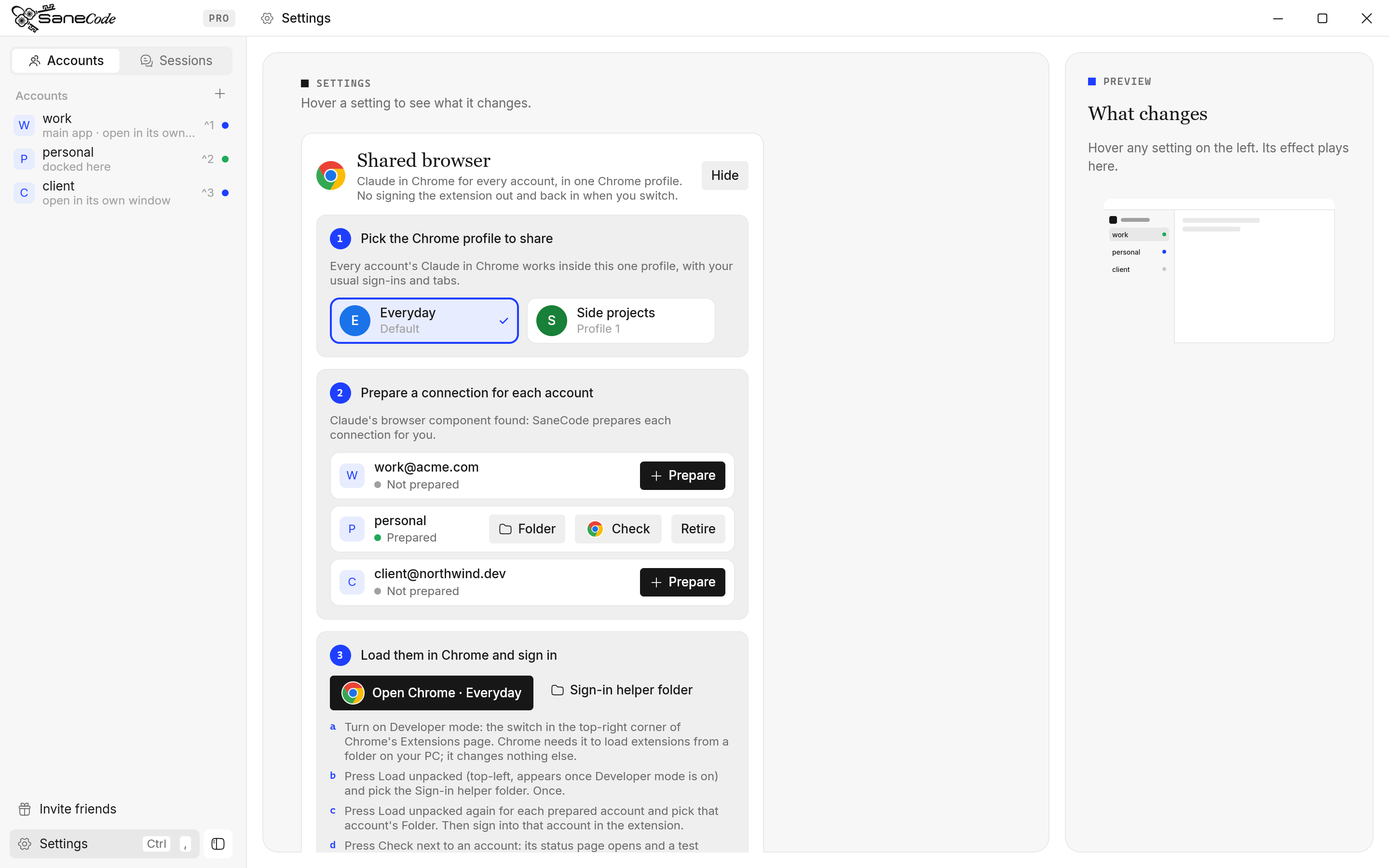
Normally the Claude in Chrome extension is signed into one account, the same one as your desktop app. Switch accounts and you sign the extension out and in again, or keep a separate Chrome profile for each account. In SaneCode, Settings → Shared browser gives every account its own connection inside the Chrome profile you already use, with your usual sign-ins and tabs. Pick the profile (with the picture Chrome shows for it), prepare each account, and open that exact profile in Chrome to load them.

  • One Chrome profile, every account’s Claude in Chrome
  • One-time setup: turn on Developer mode in Chrome’s Extensions page, then Load unpacked for each account
  • Computer use works in every account too: each one is the full desktop app
  • SaneCode never reads extension tokens or closes your tabs

Set up the shared browser

SaneCode Settings: pick one Chrome profile, prepare a Claude in Chrome connection for each account, then open that profile in Chrome
Before you install

Will it slow down your PC or break Claude? No.

Native and GPU-drawn

SaneCode is written in Rust and draws its window on the GPU. It has no browser engine of its own, so it adds one small process next to your Claude windows, not another Electron app. When you aren’t touching it, it draws nothing and uses no CPU; background work (finding processes, reading folders) runs off the UI thread, so switching accounts stays instant.

Never takes your windows

A Claude window you opened yourself stays yours: SaneCode marks that account “open in its own window” and only brings it in when you ask. When you quit SaneCode, every docked Claude goes back to the desktop at the size and place it had, and keeps running. If Claude closes itself to the tray, SaneCode lets it go and reopens it when you click the account.

Uses your plan like normal

Each account is the official Claude desktop app, so every message counts against that account’s plan exactly as it would without SaneCode. Nothing goes through the Claude Code CLI, the Agent SDK or an API key. That matters: Agent SDK traffic was metered about 1.7× faster against the 5-hour limit than Claude Code, and SaneCode never touches that path.

Works with the Claude you have

SaneCode runs Claude desktop on Windows 10 and 11 as installed from claude.com or the Microsoft Store (the same app), the one Windows users already have. On first run it finds that Claude and brings it in as your first account, still signed in, with its chats, Code sessions and connectors. Extra accounts sign in once each, with a guide beside them.

Survives Claude updates

Because every account runs the unmodified app, each Claude update lands in SaneCode the day it ships: new features, new models, the same behavior. SaneCode notices when Claude was updated or reset, checks that every account’s folder is still wired up, and if a reset left the main account signed out, repairs it in one click without deleting anything.

Your data stays put

Every account’s data stays in folders on your own PC, in the same format Claude desktop uses. SaneCode never reads or copies your sign-in tokens, never asks for a password, has no account of its own and sends no telemetry. Its diagnostic log stays on your PC, leaves chat titles out, and can be turned off. Moving a conversation with Session Relay only adds it to another account’s list; nothing is uploaded.

Compared

Multi-account, without leaving the desktop app.

There are three ways people run several Claude accounts today. Signing out and in keeps the desktop app but holds one account at a time, and the Claude in Chrome extension has to be signed out and in again with it. The CLI runs each account in its own terminal with its own config folder, for example set CLAUDE_CONFIG_DIR=%USERPROFILE%\.claude-work then claude in one window and the same with .claude-personal in another: it works, but you get Claude Code alone, without the desktop app’s chats, projects, connectors, computer use or Claude in Chrome. Orchestrators such as T3 Code drive accounts through Anthropic’s Agent SDK behind their own interface, and Agent SDK traffic was metered about 1.7× faster against the 5-hour limit. SaneCode keeps the official desktop app for every account, all signed in at once, with computer use in each and Claude in Chrome for all of them in the same Chrome profile.

SaneCodeSign out / sign inCLI / SDK orchestrators
Uses the real Claude desktop appYesYesNo
Several accounts open at onceYesNoYes
Switch without signing out (app and browser)YesNoYes
See several accounts side by side in one windowSplit, Grid, CanvasNoVaries
Continue a session in another accountYesNoVaries
Computer use in every accountYesOne account at a timeVaries
Claude in Chrome for every account in one Chrome profileYesRe-sign the extension on every switchA Chrome profile per account
Plan usage like normal useYesYesDrains faster via SDK
Why we built it

“The Claude desktop app is too good to miss out on.”

“Orchestration tools run Claude through the Claude Code CLI, and I don’t like that. The developers of Claude know best what instructions to put into the harness, so I use the desktop app. But switching accounts is a pain: sign out, sign in, and the browser’s claude.ai session flips too, which messes up your next web chat. The browser extension has to be signed into the same account as the desktop app, so that’s a second place to sign in again. And sometimes you just want three Claude desktops running side by side, or to keep going on another account when one hits its limit.”

— , founder of SaneCode, a Claude desktop user on Windows with several accounts

Who is SaneCode for?
  • Developers who use Claude desktop and Claude Code with two or more Claude accounts
  • Freelancers and consultants with a client’s Claude Team seat plus their own plan
  • Anyone who hits usage limits and keeps a second account to carry on
  • People who prefer the native app over CLI or SDK orchestrators
Who is it not for?
  • Mac or Linux users: SaneCode is Windows-only for now
  • People with one Claude account: the desktop app alone is enough
  • Teams who want many different agents (Codex, Cursor…) behind one interface: an orchestrator like T3 Code fits better
How much does it cost?

Free for up to 2 accounts, with Split and Grid layouts. Pro, $29 a month, includes everything in Free plus unlimited accounts, the Canvas layout, Session Relay, the shared browser, the tray and global hotkeys. Claude itself is billed by Anthropic as usual: SaneCode doesn’t resell or add usage.

How long does setup take?

About two minutes. Install, let SaneCode bring in your current Claude, then add each other account and sign in once (guide).

What are the limits?

Windows only. Claude desktop from claude.com or the Microsoft Store. Continuing in another account works for Claude Code sessions, not claude.ai chats. Shared browser setup loads each account’s extension into Chrome once, by hand (guide).

Pricing

Start free. Go Pro when you run more.

Free
$0
  • Up to 2 accounts
  • Docking, switching, Ctrl+1…9
  • Split and Grid layouts, chat tabs
  • Imports your existing Claude
  • Update checks and repair
Download
Pro
$29 / month
  • Everything in Free, plus:
  • Unlimited accounts
  • Canvas layout: arrange any number freely
  • Continue sessions in another account
  • Claude in Chrome for every account in one Chrome profile
  • Plain white or dark window, without the ocean
  • Tray, start with Windows, global hotkeys
  • On every PC you sign in on
Get Pro
FAQ

Questions

Is this the real Claude desktop app?

Yes. SaneCode starts the official Claude desktop (from claude.com or the Microsoft Store) once per account and docks its window. It doesn’t modify Claude, go through the CLI or SDK, or show you a copy of its UI.

Does SaneCode swap Claude’s data folders?

No. Claude desktop is installed once and SaneCode starts it once per account, each copy with its own data folder, all running at once. Switching only changes which window you see.

Does it use more of my plan?

No. Each account uses its plan exactly as it would on its own. Nothing runs through the API or SDK.

Do I have to sign in again?

No for the Claude you already use: SaneCode finds it and brings it in, signed in. Each new account is signed in once, then stays signed in.

What happens to my Claude windows if I close SaneCode?

They come back to the desktop, exactly where and how big they were, and keep running. You can choose in Settings to close them with SaneCode instead.

How does continuing in another account work?

Claude stores the conversation of a Code session on your PC, shared by all accounts; each account only keeps its own list. SaneCode adds the session to the other account’s list, so it opens there with the whole conversation.

How do I use two Claude accounts at the same time on Windows?

Install SaneCode, let it bring in the Claude you already use, then add your second account with +. Each runs as its own Claude desktop inside SaneCode; switch with a click or Ctrl+1/Ctrl+2, both stay signed in.

Is SaneCode an orchestrator like T3 Code?

No. Orchestrators drive agents through their CLI or SDK behind their own interface. SaneCode runs the official Claude desktop app for each account, and you talk to Claude directly.

Does using Claude through an orchestrator drain my limits faster?

It has. Anthropic’s 5-hour meter charged Agent SDK traffic about 1.7× more than Claude Code for the same tokens, so SDK-based tools like T3 Code drained the 5-hour limit faster until T3 Code changed how it labels requests in v0.1.7 (weekly limits were not affected). SaneCode is not affected either way: it uses the official Claude desktop app.

How long does it take to set up SaneCode?

About two minutes. SaneCode finds the Claude desktop you already use and brings it in signed in; every extra account signs in once with a built-in guide.

Can I see two Claude accounts side by side?

Yes. Pick Split in SaneCode’s title bar for two side by side or Grid for four in a 2×2, both free; Canvas (Pro) lets you move and resize any number of Claude windows freely. Any account or chat can go in any pane, and the layout is remembered.

What happens when I pop out a chat in Claude desktop?

It opens in its own window as usual, and SaneCode shows “+1 window” in its title bar. Click it to bring the chat in as a tab next to the main Claude window; in Split, Grid or Canvas it goes into a pane. Send it back out from the tab any time.

Can I change the theme of Claude desktop or Claude Code?

Yes, for the Code tab. In SaneCode’s Settings, Claude theme applies Ocean or Ocean colours to Claude Code in every account at once, in light or dark. It uses Claude Code’s own theming, so Claude desktop isn’t modified, and Claude’s standard theme is one click away.

Does SaneCode send telemetry?

No. SaneCode keeps a small diagnostic log on your PC for bug reports (never your chat titles or messages) and never sends it. You can turn it off in Settings.

Do I need to reinstall Claude desktop?

No. SaneCode uses the Claude desktop you already have, from claude.com or the Microsoft Store, and never installs, patches or replaces it. Every account runs that same installed app; Claude updates itself as usual and every account gets the update at once. If Claude isn’t installed yet, SaneCode links you to the download.

Does SaneCode make copies of Claude or of my data?

No duplicates of anything. Claude is installed once. What each account has of its own is what Claude itself keeps per sign-in: a data folder on your PC with that account’s login and settings. SaneCode starts the installed Claude with that folder as a launch parameter, once per account. Your projects, code and Claude Code conversations aren’t copied; every account uses the same ones.

Does SaneCode move or rewrite my files?

Your projects, repositories and Claude Code’s own folder (%USERPROFILE%\.claude, with its settings, plugins and conversations) are never moved: every account uses them where they already are. One thing moves, once, on first run: Claude desktop’s data folder is renamed into SaneCode’s account folder (same drive, instant, nothing copied) and a link is left in its old place, so Claude opens exactly as before. Why: a Claude repair, reset or reinstall clears that folder, which signs the account out and loses its settings; kept in SaneCode’s folder, only the link is cleared, and SaneCode puts it back in one click. SaneCode never deletes inside an account’s folder; if a Claude reset leaves a fresh folder behind, the old one is kept beside it, not removed. A move that can’t be done in one step isn’t done at all.

What if my Claude folders are on another drive or behind a link?

SaneCode looks at the folders and links that are actually there instead of assuming fixed paths, and it never follows a link to delete or rewrite what’s behind it. You can keep account folders on another drive (Settings → Locations). If a custom setup can’t be brought in safely, SaneCode leaves it as it is, and you can still add accounts beside it.

Which Claude desktop does SaneCode work with?

Claude desktop on Windows 10 and 11, installed from claude.com/download or the Microsoft Store: both install the same app, and SaneCode works with either. The only build it doesn’t run is the old standalone one some people got through winget (Anthropic.Claude), which is stuck on version 1.x; install the current one from claude.com and SaneCode brings your account in.

Can each account use Claude in Chrome and computer use?

Yes. Every account is the full Claude desktop app, so computer use works in each one as it does on its own. For Claude in Chrome, SaneCode gives every account its own extension connection inside one Chrome profile, so you don’t sign the extension out and back in when you switch, and you don’t need a Chrome profile per account. Set it up in Settings → Shared browser.

Mac?

Windows for now. macOS can’t host other apps’ windows the way Windows can, so it needs a different approach.